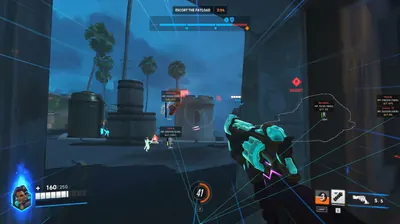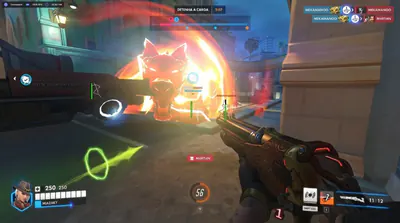
Overwatch and Overwatch 2 on Windows PC

Overwatch Cheats Aimbot, ESP and Radar

Overwatch Cheats documents listed tools for Overwatch and Overwatch 2, the Blizzard hero shooter. Play this game on Windows PC with optional aimbot, player ESP for Overwatch characters, and 2D/3D radar. Read the listing, then check the new season and status before you buy.

Start with the features list, compare monthly and lifetime plans, then check current status and Windows PC setup before checkout.

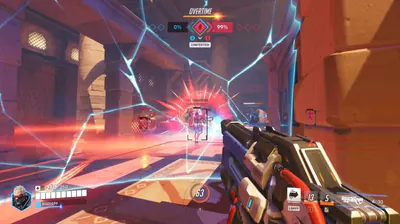
Overwatch 2 aim overlay during overtime in a close indoor fight

Windows PC

Platform

2

Plans

USD

Currency

Worldwide

Market

Features

Overwatch modules you can inspect before checkout

Aimbot, player ESP, hero labels, objective markers, and radar taken from the current product listing.

Aimbot

Optional targeting help.

Aimbot is the combat option people mean when they search Overwatch aimbot. Leave it off until you confirm current status and accept the extra risk combat modules add.

  • Aimbot with optional aim assist
  • Silent aim and triggerbot toggles
  • Use only after you review status

Player ESP

Read nearby heroes.

Player ESP is the overlay people mean by Overwatch wallhack. It can mark enemies with box, skeleton, health, name, and distance so you spend less time guessing who is around a corner.

  • Box ESP and skeleton ESP
  • Health ESP, name ESP, and distance ESP
  • Enemy-only ESP with team check

Hero ESP

Identify the roster.

Hero ESP labels the hero someone locked so you can read tanks, damage, and supports before a fight starts on the objective.

  • Hero name labels
  • Role context from the roster
  • Pairs with player ESP

Ability ESP

Track listed abilities.

Ability ESP can highlight listed ability states so you can read ultimates and key cooldowns without inventing extra combat automation.

  • Listed ability markers
  • Ultimate-state cues when present
  • Keep the overlay quiet

Objective ESP

Payloads and points.

Objective ESP marks payloads, capture points, and push bots so rotations stay tied to the live objective instead of empty side rooms.

  • Payload and point markers
  • Push-bot cues
  • Distance to the objective

Radar

Local 2D and 3D awareness.

Radar sits next to ESP so you can rotate around nearby enemies without covering the screen in boxes. Both 2D radar and 3D radar are listed.

  • 2D radar with team color coding
  • 3D radar for vertical fights
  • Adjustable range

Team Check

Enemies first.

Team check and enemy-only ESP keep friendly heroes off the overlay so you can read the other team in 5v5 without extra clutter.

  • Team check filter
  • Enemy-only ESP
  • Works with box and name ESP

Silent Aim

A separate combat toggle.

Silent aim and triggerbot stay optional. Farming bots and movement macros are not listed, so this site does not claim them.

  • Silent aim as an optional module
  • Triggerbot listed separately
  • No invented automation

Compatibility

Windows PC and Defense Matrix.

The current listing is Windows 10 and 11 for Overwatch. Re-check status after game updates. Blizzard Defense Matrix is treated as unverified compatibility context, not a bypass promise.

  • Windows 10 and 11
  • Battle.net and Steam PC
  • Review status after patches

Store

Overwatch Cheats store

Compare monthly and lifetime Overwatch Cheats plans for Overwatch 2, plus Cloud DMA and HWID Spoofer extras that run with the cheat.

  • Available
  • Overwatch 2
  • Windows PC
  • Aimbot
  • ESP
  • 2 plans
Overwatch 2 aim overlay during overtime in a close indoor fight
Available
Overwatch Cheats
Overwatch 2
Windows PC

Overwatch Cheats

Overwatch Cheats for Overwatch 2 on Windows PC: aimbot, aim assist, silent aim, triggerbot, player ESP for OW characters, and 2D/3D radar.

  • Aimbot
  • Player ESP
  • Hero ESP
  • Radar
  • Objective ESP
  • Team check

Monthly

$35

USD / month · 30 days

Try listed ESP, radar, and aimbot for 30 days.

  • Same listed ESP, radar, and aimbot set
  • Optional silent aim and triggerbot
  • Windows PC via Battle.net or Steam
Choose Monthly

Lifetime

Best value

$150

USD · one-time · One-time

Same listed modules, billed once in USD.

  • Same listed ESP, radar, and aimbot set
  • Optional silent aim and triggerbot
  • Windows PC via Battle.net or Steam
Choose Lifetime

Included modules

Modules both plans include

All features
  • Aimbot
  • Aim Assist
  • Silent Aim
  • Triggerbot
  • ESP
  • Player ESP
  • Box ESP
  • Skeleton ESP
  • Health ESP
  • Name ESP
  • Distance ESP
  • Hero ESP

Extras that run with the cheat

Cloud DMA and HWID Spoofer

Extra
DMA hardware

Cloud DMA

$50

$50 · USD · one-time

Cloud DMA is a $50 one-time extra that runs with Overwatch Cheats on Windows PC. Checkout is $50 one-time.

  • $50 one-time
  • Windows PC
  • Runs with the cheat
Extra
System utility

HWID Spoofer

$50 / $150

Monthly $50 · Lifetime $150

HWID Spoofer is a $50 monthly or $150 lifetime extra that runs with Overwatch Cheats on Windows PC.

  • Monthly $50
  • Lifetime $150
  • Runs with the cheat

Why us

A single-game listing for Overwatch—not a mixed catalog

Overwatch Cheat stays on one title. Read features, plans, and status on overwatchcheat.com before you pay.

  • Overwatch only

    The catalog, pricing, and guides stay locked to Overwatch rather than bundling other titles.

    Overwatch Cheat
    Typical listing
  • Listed features only

    We only document overlays that appear on the live listing, and we skip unverified automation extras.

    Overwatch Cheat
    Typical listing
  • Monthly and lifetime plans

    Pick a 30-day $35 pass or a $150 one-time license. Checkout shows the latest access notes.

    Overwatch Cheat
    Typical listing
  • Status before launch

    Game updates can shift compatibility. Confirm the status page after every patch.

    Overwatch Cheat
    Typical listing
  • Windows PC requirements

    Windows 10/11 is the supported platform. Cloud DMA and HWID Spoofer extras run with Overwatch Cheats on that PC.

    Overwatch Cheat
    Typical listing
  • Support on the record

    Open support for order, install, or overlay questions and include your receipt email plus OS build.

    Overwatch Cheat
    Typical listing

$35

Monthly plan

Thirty-day access billed in USD.

$150

Lifetime plan

One-time USD purchase for long-term access.

PC

Official platform

Overwatch Cheat is listed for Windows PC. Console clients are not listed.

Setup guide

From checkout to a configured overlay in three clear steps

Confirm status, finish checkout, then follow the vendor notes for Windows PC before you launch Overwatch.

  1. Confirm status and requirements

  2. Choose a plan and complete checkout

  3. Configure ESP, radar, and keys

How it works

From status check to a saved config.

A straight path from reviewing Overwatch compatibility to a profile you can reuse.

4 easy steps

  1. 01

    Check current status

    Read the status page on overwatchcheat.com after any Overwatch client update.

  2. 02

    Choose monthly or lifetime

    Select the $35 monthly plan or the $150 lifetime plan, then continue to checkout.

  3. 03

    Follow Windows PC instructions

    Use the vendor setup notes for Battle.net or Steam. Cloud DMA and HWID Spoofer extras run with Overwatch Cheats on that PC.

  4. 04

    Save a conservative profile

    Enable the ESP and radar options you can actually read, then save the config.

Guides

Guides and updates

Overwatch 2 heroes, Overwatch characters, patch notes, ranks, skins, and Windows PC setup for this Blizzard game.

Review Overwatch cheats, OW overlays, and plans before you play this Blizzard game on a new season of Overwatch 2.

How player ESP, box ESP, skeleton ESP, health ESP, and name ESP present nearby Overwatch 2 heroes on PC.

What aimbot, silent aim, and triggerbot are listed for in Overwatch 2, and why they stay optional after you check status.

FAQ

Questions about this page

Answers tied to what you are reading—visit the FAQ page for every topic.